
Module 3
Book sales calls by providing excellent content via Facebook Live videos.

The Tactic
Facebook Live is a simple, free tactic to get seen by your audience and demonstrate your expertise. It’s a great way to get fast leads because with every video you’ll invite listeners to connect with you further. People want to connect! According to a study done by Vimeo, 78% of online audiences are tuning into livestream video and people are three times more likely to engage with live video content over traditional content. So, are you giving your audience something to engage with? If not, it’s time to get started… it can even be fun! Try being consistent for the best engagement. At the top of the year, our team started doing a Facebook Live series called 100 Days of More on our Driven Inc. Facebook page. We’re still in the middle of those 100 days, but we’ve seen an uptick in growth as we’ve continued to give people something to look forward to each morning. The trick to doing a series is to be a problem solver! Do your videos on specific, tactical solutions your audience can use right away. People want action steps, so be sure to give people a tangible action that they can follow. Don’t be a generalist - be specific and solve the real life problems they are facing today
STEPS TO DOING A FACEBOOK LIVE EVENT
You can do a Facebook Live from your computer or your mobile device. Here are the steps to follow... Step 1: Select a hooky topic Before going live have an idea of what you’re going to cover. Here are some ideas of things you can cover: 1. Hot topics. Pick a frequently asked question you hear from leads and clients. Do a deep dive on a specific issue you see your market wondering about the most. 2. Latest news. Keeping your audience informed on industry trends without being overly sales-focused is a much more natural way to build trusted followers on Facebook. People will start turning to you as their go-to source to stay informed on industry news, and you’ll build a loyal and engaged following. 3. Personal stories and anecdotes as it relates to some benefit for the listener. Don’t just share a personal story for the sake of telling a story. You have to link it to teaching or benefit for the listeners. Share how and why it’s relevant to them. 4. Behind the scenes. Give a tour of your office and/or team. Show where the magic happens. 5. Case studies. Share a story of a client and link it with a teaching point that’s beneficial to the listener. 6. Give a recap from an in-person talk or event you just led for those who couldn’t attend. Step 2: Select a call to action Come up with what action you want the viewer to take. What’s the next step in connecting with you? Identify this in advance. Possible calls to action are: 1. Private message you. 2. Book a call with you. You must give a way for them to do this.It can be an invitation to private message (PM) you, send you an email, or you can send them to your scheduling calendar. 3. Send them to your website for a free gift. 4. Send them to an event page to register for an event. By default, in addition to a specifi c call to action, you should always tell people to like and follow you on Facebook to hear more great content.
Step 3: Select the “Live Video” button where you make posts. Follow the instructions from there
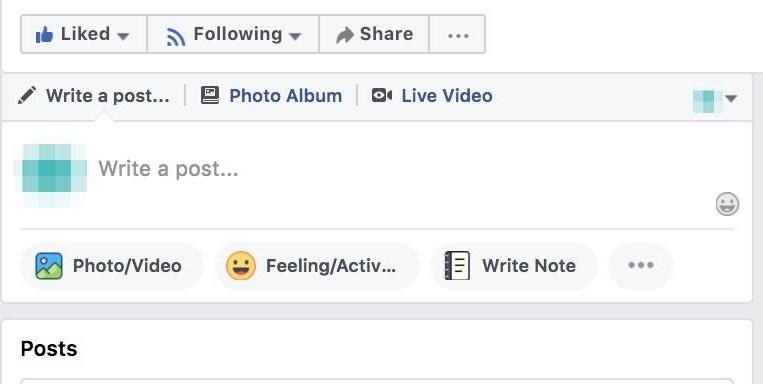
Step 4: Write a click-worthy description Your description and video thumbnail are the most important hooks for your video. Without compelling copy to entice your viewers, your live video isn’t going to get much traction. When writing your copy, ensure it’s direct, actionable, and informative, with a hint of mystery to spark curiosity in your viewers.
Step 5: Go live! Remember to go for at least 15 minutes to get more viewers. Click “Finish” when you’re done going live.
Step 6: Interact with people When you are live people can interact with you. They can send you thumbs up, hearts, and smiley faces. And they can comment as you’re live, which is great because you can respond in the moment and answer questions live. Since you will be live for at least 15 minutes, start with a couple minutes welcoming people and starting to talk about what you will cover. This gives people time to see you in their newsfeed and time to join you. After a couple minutes dive into your content. During the broadcast ask questions, and then ask your viewers to re- ply in the comments. ALWAYS ask them to like and share your page and post. Say hello to commenters by name and respond to their comments. Your audience will be thrilled to hear you mention their name and answer their questions when you are live.
Step 7: Post your live video on your page & make any desired edits Once you’re no longer live, your video can still live on for late viewers to enjoy. Share your video on your personal page, and make any edits you need to the description, add a thumbnail, and add captions. Pin your most recent video to the top of your page. Once your video is done live streaming you can boost your post. For about $10 - $20 per video your video will be seen by many more people who have liked your business page. It’s worth it!
FACEBOOK LIVE TIPS
Step 1. Only do Facebook Live videos on your business page. Don’t get in the habit of doing them only on your personal page. Do them on your business page and you can then share it on your personal page. Send people to your business page so you build a stronger following on your business page.
Step 2. Tell people ahead of time when you’re going to broadcast. Make a post 24 hours before and 15 minutes before to let people know you’re doing one. If you do them weekly you can post every Monday as a reminder. Don’t just say “I’m going live.” Explain the value they will receive when they attend live - give the benefits they’ll get when they listen. If you have an email list, let them know about your series.
Step 3. Go live when you have a strong internet connection.
Step 4. Have a light in front of you. Make sure your face is illuminated. Face a window for the best lighting. Facebook Live Tips
Step 5. Film horizontally on your mobile device.
Step 6. Make sure you have a nice and/or neutral background. People will judge you by what’s in the background! If you are at home, make sure you clean up your background.
Step 7. Get personal. The beauty of Facebook Live is that it allows you to share your experiences in real-time, and make a more human connection with your audience.
Step 8. Smile and show energy.
Step 9. Embrace small mistakes. Don’t worry if problems happen live. Don’t get flustered - just roll with it.
Step 10. Be on live for a minimum of 15 minutes. You need time for people to come across your live video in their newsfeed.
Step 11. Do your live videos at the same time every day for your series. This way people can plan to attend.
Step 12. If you have an email list, let them know the schedule for your live videos.
Step 13. Important: Always give a call to action on each video. This can be an invitation for them to PM (private message) you on Facebook or email you directly. a. Give a powerful reason WHY they should contact you. It’s got to be something that’s in their best interest, not yours. Give a hook that compels them to do your call to action.
Action Steps
Come up with your Facebook Live topics.
1. Brainstorm the problems you solve. These must be practical, real life problems. Don’t get stuck in your head. Don’t be theoretical. These all must be tactical problems. A tactical problem is something you can put on a table. a. What do you hear your people complain about the most? b. What do you see your market struggling with the most? c. What do you know are the biggest issues your market faces right now?
2. Choose the top 10 hottest, more relevant, most urgent problems your market is facing right now. Use the worksheet on the next page.
3. For each problem you’ve identified, write at least two specific solutions to that one specific problem. This will give you at least 20 pieces of content.
4. Do a Facebook Live for each specific solution. Remember, be a problem solver. Give real life, tangible solutions to solve the problem. Don’t be heady or concepture. People want practical things they can DO, not “think about”.
Problem > Solution Content For Your Facebook Lives
Problems. Solutions
1
2
3
4
5
Easy to follow content for your video
Don’t write a script! You don’t need to. But you can use a simple outline to guide your Facebook Live. Choose from any or all of the following outlines to guide you. Always end your video with a call to action to take the next step with you. 1. State the problem. 2. Agitate the problem. a. What is this problem costing people? b. What are the ripple effects of this problem in other areas? c. What’s at stake if you don’t solve this problem? 3. Solve the problem. a. Give a step-by-step solution to the problem. b. Focus on what people can do right now. c. Give examples. Tell stories. 4. Call to action. a. Invite people to contact you so you can help them solve this problem with custom solutions. 1. Inspire a. Grab their attention with a shocking statistic and/or provocative question. 2. Educate a. Teach your content. Tell stories. Give examples. 3. Invite a. Invite people to take the next step with you. 4. Motivate a. Give a reason for people to act on your invitation right now. This can be a limited number of spots open and/or a limited time this is available.
Why /What/ How/ What if Template
1. Why is this problem/topic so important?
2. What is the problem/topic? a. Give a description with lots of examples and stories.
3. How to solve the problem. a. Give the step-by-step solution to the problem.
4. What If… a. Answer questions from people who want to know how this content applies to them. b. Give your call to action. W
Action Steps
Monday: Brainstorm the content for your series. Decide how many days your series will be. Decide what time you’ll do your live videos every day.
Tuesday: Email your list telling them about your new Facebook Live series. Post on social media when you’ll do your first Live video.
Wednesday: Do your first Facebook Live. Share on social media and to your email list one of your new offers.
Thursday: Do your second Facebook Live.
Friday: Do your third Facebook Live. Send a second email to your list reminding them of your Facebook Live series and share some of the positive feedback you’re getting
Saturday: Do your fourth Facebook Live. Sunday: Continue every day for the duration of your series.